




If you run a WordPress website and monetize it through ad networks like Google AdSense, Google Ad Manager, or any programmatic advertising platform, you have likely come across the term ads.txt. Getting this file right is critical for your ad revenue — and doing it the wrong way can cost you money. The good news? There is a plugin that makes it incredibly simple.
In this article, we will walk you through everything you need to know about ads.txt on WordPress and why the AdX Ad Inserter Plugin is the best tool for the job.
What Is ads.txt and Why Does It Matter?
ads.txt stands for Authorized Digital Sellers. It is an IAB Tech Lab initiative that allows publishers to publicly declare the companies authorized to sell their digital ad inventory.
When you add an ads.txt file to your website, you are essentially telling ad buyers and platforms: “These are the only networks and sellers permitted to sell ads on my site.” This single text file plays a huge role in protecting your ad revenue from domain spoofing and unauthorized resellers.
Without a properly configured ads.txt file, ad networks like Google AdSense may reduce or block ads from appearing on your site entirely. In fact, Google regularly sends warning messages to publishers whose sites are missing or have incorrectly configured ads.txt files.
In short — if you want full ad revenue and advertiser trust, ads.txt is not optional. It is essential.
The Challenge of Adding ads.txt on WordPress
WordPress does not have a built-in option to create or manage an ads.txt file. Traditionally, website owners had to:
- Manually create a plain text file named
ads.txt - Upload it via FTP to the root directory of their website
- Update it every time an ad network required a new entry
For non-technical users, this process is confusing and error-prone. Even for developers, manually editing and re-uploading files every time an ad network changes their requirements is tedious and time-consuming.
This is exactly where a dedicated WordPress plugin becomes invaluable.
Introducing AdX Ad Inserter Plugin — The Best ads.txt Plugin for WordPress
The AdX Ad Inserter Plugin is a powerful, lightweight, and user-friendly WordPress plugin specifically designed to make managing your ads.txt file effortless. Whether you are a blogger, publisher, or digital marketing professional, this plugin removes all the technical friction from the process.
You can find and install it directly from the official WordPress Plugin Repository: 🔗 https://wordpress.org/plugins/adx-ad-inserter/
Key Features of AdX Ad Inserter Plugin
1. Easy ads.txt Management From Your Dashboard
With AdX Ad Inserter, you never need to touch an FTP client or your hosting file manager again. The plugin gives you a clean interface directly inside your WordPress admin dashboard where you can paste, edit, and save your ads.txt content in seconds.
2. No Coding Required
You do not need to be a developer to use this plugin. The interface is designed for everyone — from complete beginners to experienced webmasters. Simply install, activate, configure, and you are done.
3. Instant File Generation
As soon as you save your ads.txt content through the plugin, it becomes instantly accessible at yourdomain.com/ads.txt. No cache clearing, no FTP uploads, no server restarts — it just works.
4. Supports Multiple Ad Networks
Whether you are working with Google AdSense, Google Ad Manager, Media.net, Ezoic, Pubmatic, or any other programmatic advertising platform, AdX Ad Inserter supports all of them. You can add as many authorized sellers as you need with no limitations.
5. Lightweight and Fast
Unlike bloated plugins that add unnecessary scripts and slow down your site, AdX Ad Inserter is built to be lightweight. It does one job and does it exceptionally well — without affecting your site speed or WordPress performance.
6. Regular Updates and Compatibility
The plugin is actively maintained and regularly updated to stay compatible with the latest versions of WordPress. You can count on it to work reliably as WordPress evolves.
How to Install and Set Up AdX Ad Inserter on Your WordPress Site
Getting started with AdX Ad Inserter takes less than five minutes. Here is a step-by-step guide:
Step 1 — Install the Plugin Go to your WordPress admin panel. Navigate to Plugins → Add New. Search for AdX Ad Inserter. Click Install Now and then Activate.
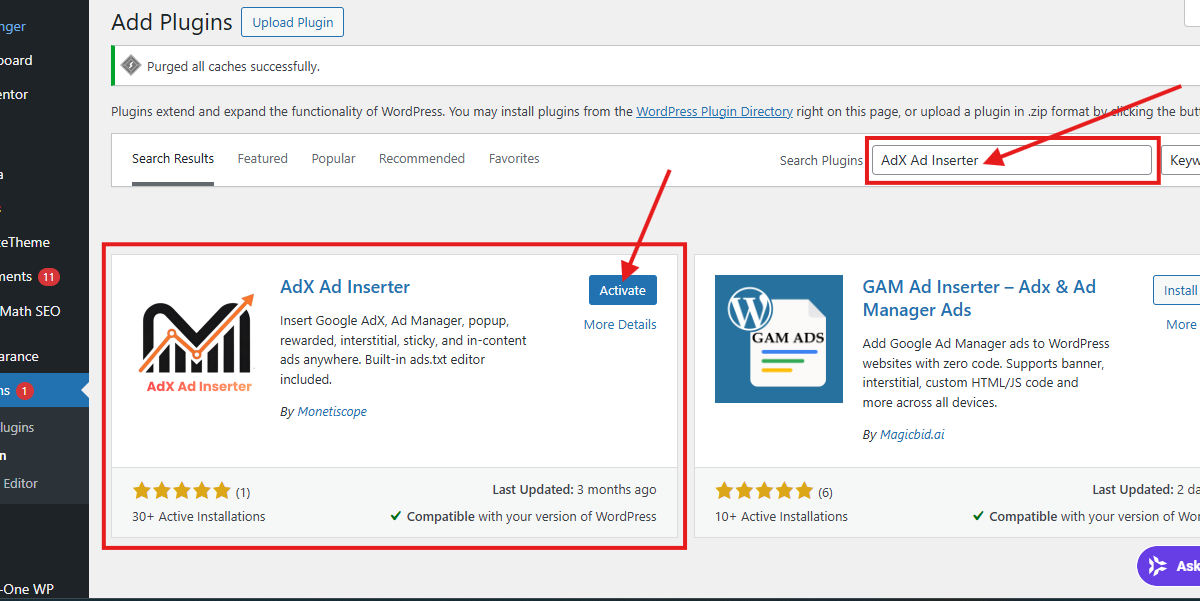
Alternatively, visit https://wordpress.org/plugins/adx-ad-inserter/ and download the plugin manually, then upload it via Plugins → Add New → Upload Plugin.
Step 2 — Open the Plugin Settings Once activated, you will find the AdX Ad Inserter settings in your WordPress dashboard menu. Click on it to open the configuration panel.
Step 3 — Add Your ads.txt Content Paste your ads.txt entries into the provided text area. These entries are typically provided by your ad network. A standard Google AdSense entry looks like this:
google.com, pub-0000000000000000, DIRECT, f08c47fec0942fa0
Replace the publisher ID with your actual AdSense ID.
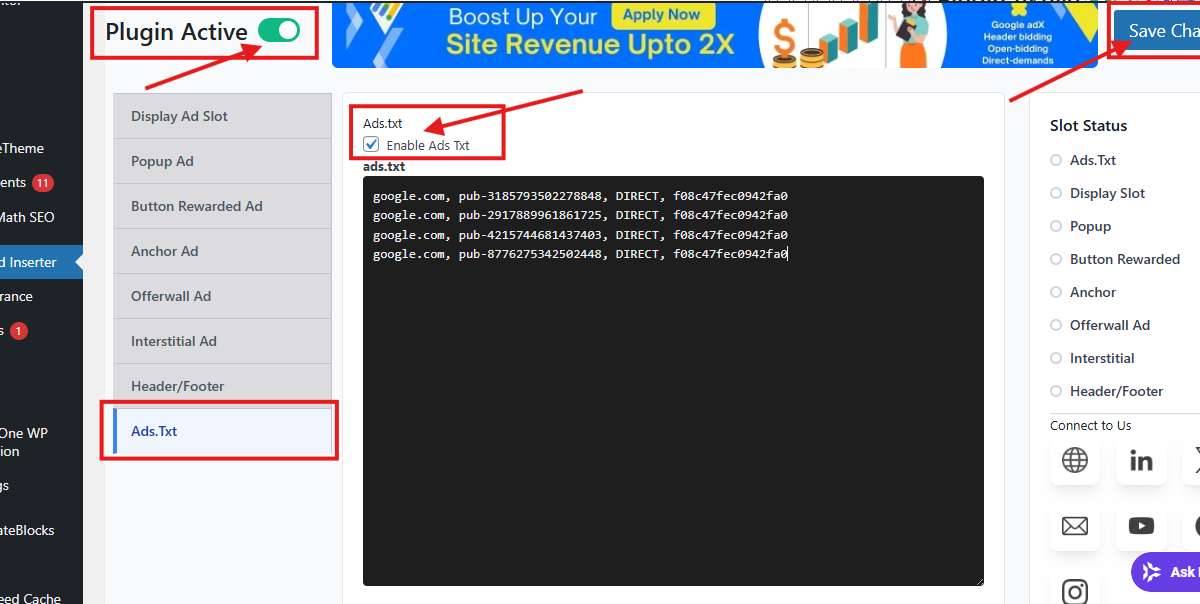
Step 4 — Save and Verify Click Save. Then open a new browser tab and visit https://yourdomain.com/ads.txt to confirm the file is live and displaying your entries correctly.
That is it. Your ads.txt file is now active and will be recognized by all major ad platforms.
Why AdX Ad Inserter Is Better Than Manual Methods
| Feature | Manual FTP Method | AdX Ad Inserter Plugin |
|---|---|---|
| Technical Skill Required | High | None |
| Time to Set Up | 15–30 minutes | Under 5 minutes |
| Easy to Update | No | Yes |
| Risk of Errors | High | Very Low |
| Works With All Ad Networks | Yes | Yes |
| WordPress Dashboard Integration | No | Yes |
The comparison is clear. AdX Ad Inserter is faster, safer, and far more convenient than any manual approach.
Who Should Use AdX Ad Inserter?
This plugin is ideal for:
- Bloggers and content creators who monetize through AdSense or other ad platforms
- Digital publishers managing multiple ad network relationships
- SEO professionals who manage WordPress sites for clients and need a reliable ads.txt solution
- E-commerce site owners running programmatic ads alongside their store
- Agencies looking for a scalable, easy-to-manage ads.txt solution across multiple WordPress installations
If your WordPress website displays ads of any kind, this plugin belongs in your toolkit.
Common ads.txt Mistakes That Cost Publishers Money
Many publishers unknowingly make errors with their ads.txt files that directly affect their ad earnings. Here are the most common mistakes — and how AdX Ad Inserter helps you avoid them:
Mistake 1 — Uploading ads.txt to the Wrong Directory ads.txt must live at the root domain level (e.g., yourdomain.com/ads.txt), not in a subdirectory. AdX Ad Inserter automatically places it in the correct location.
Mistake 2 — Formatting Errors in the File A single typo or incorrect line break in your ads.txt file can cause ad networks to reject it entirely. The plugin’s clean text editor reduces the chance of formatting issues.
Mistake 3 — Forgetting to Update When Adding New Networks Every time you join a new ad network, you must add their entry to your ads.txt file. With AdX Ad Inserter, updating your file is as simple as editing a text field and clicking save.
Mistake 4 — Not Having ads.txt at All Thousands of WordPress publishers are still operating without any ads.txt file. If you are in this group, you are likely losing a portion of your eligible ad revenue right now. Installing AdX Ad Inserter today is the fastest fix.
Final Verdict — Is AdX Ad Inserter the Best ads.txt Plugin for WordPress?
Absolutely. The AdX Ad Inserter Plugin earns its place as the best plugin for adding ads.txt on WordPress sites because it combines simplicity, reliability, and performance in one free package. It eliminates the technical barriers that prevent many publishers from properly setting up their ads.txt file, and it integrates seamlessly into the WordPress workflow that millions of site owners already know.
If you are serious about maximizing your ad revenue and protecting your inventory from fraud and unauthorized sellers, this plugin is a must-have.
Install AdX Ad Inserter now: https://wordpress.org/plugins/adx-ad-inserter/
Frequently Asked Questions
Is AdX Ad Inserter free to use?
Yes, the plugin is completely free and available directly from the official WordPress plugin repository.
Will this plugin work with my WordPress theme?
Yes. AdX Ad Inserter works independently of your theme. It generates the ads.txt file at the server level, so theme compatibility is never an issue.
What if I already have an ads.txt file on my server?
If an ads.txt file already exists on your server, you should copy its existing content into the plugin before saving, to ensure no entries are lost.
Does ads.txt affect my SEO?
ads.txt does not directly impact search engine rankings, but it does protect your ad revenue and publisher credibility, which supports the overall health and sustainability of your website.
Can I use AdX Ad Inserter on multiple WordPress sites?
Yes. You can install and use the plugin on as many WordPress sites as you manage.