




If you run a WordPress website, ads can become your primary income source. However, placing ads correctly makes a huge difference. Poor placement reduces revenue and damages user experience. On the other hand, smart placement increases earnings and improves engagement.
Many publishers struggle with inserting ads properly. They copy long scripts repeatedly. They edit theme files. They risk breaking their site. Therefore, ad placement plug-ins solve this problem.
These plug-ins simplify ad management. They reduce manual work. They improve performance. They also help optimize revenue.
In this article, you will learn about the top 5 ad placement plug-ins for WordPress. You will understand their features, benefits, and ideal use cases.
Why You Need an Ad Placement Plug-in
Before exploring plug-ins, you must understand why they matter.
Without a plug-in, you must manually insert ad code. This approach causes several problems.
1. Manual placement wastes time
You must edit multiple files repeatedly. This process becomes slow and frustrating.
2. High risk of errors
Even a small mistake breaks your layout. Sometimes, ads stop working completely.
3. Difficult ad management
Managing multiple ad slots becomes confusing. You lose control over placements.
4. Poor user experience
Incorrect placement disrupts content flow. Visitors leave your site quickly.
5. Lower revenue
Poor placement reduces impressions. Therefore, earnings decrease.
Ad plug-ins solve all these problems. They automate ad placement. They improve efficiency. They increase revenue potential.
Top 5 Ad Placement Plug-ins for WordPress
Now, let’s explore the best ad placement plug-ins available today.
1. Ad Inserter (Most Popular All-in-One Ad Plug-in)
Ad Inserter is one of the most popular WordPress ad plug-ins.
It supports AdSense, AdX, and custom ads.
Key Features
1. Insert ads anywhere
You can insert ads:
• Before content
• After content
• Between paragraphs
• Sidebar
• Header
• Footer
Therefore, you get full flexibility.
2. Supports automatic placement
You do not insert ads manually.
The plug-in handles placement automatically.
3. Advanced targeting
You can show ads based on:
• Device
• User role
• Page type
This improves ad performance.
4. Supports all ad networks
AdSense
AdX
Media.net
Custom ads
Therefore, it works universally.
2. AdX Ad Inserter (Best for Google AdX and Google Ad Manager Users)
Plugin Link:
https://wordpress.org/plugins/adx-ad-inserter/
AdX Ad Inserter is one of the most powerful and easiest plug-ins for ad placement. It works perfectly with Google AdX and Google Ad Manager.
Unlike traditional plug-ins, it removes the need for long scripts. Instead, you only paste your ad slot line.
Example:
123456/site_300x250
That’s it. The plug-in handles everything else.
Therefore, setup becomes faster and safer.
Why AdX Ad Inserter is Unique
Most plug-ins require full GPT code. However, this plug-in only needs the ad slot line.
As a result, you avoid complexity.
You do not repeat scripts.
You reduce errors.
You save time.
This makes it ideal for both beginners and professionals.
Key Features of AdX Ad Inserter
1. Simple ad slot placement
You only paste your slot line. The plug-in manages the rest automatically.
This approach simplifies ad deployment.
2. Supports multiple ad formats
The plug-in supports many ad types:
• Display ads
• In-article ads
• Anchor ads
• Interstitial ads
• Rewarded ads
• Offerwall ads
• Pop-up ads
Therefore, you can maximize revenue opportunities.
3. Header and footer code editor
You can insert scripts in header or footer easily.
No theme editing needed.
This protects your site from errors.
4. ads.txt support
The plug-in allows ads.txt placement directly.
This improves ad verification.
It increases advertiser trust.
5. Built-in AI chat support
The plug-in includes AI chat support.
You can get instant help.
This reduces troubleshooting time.
6. Clean and lightweight design
The plug-in runs fast.
It does not slow your website.
This improves user experience.
7. Works with Managed Account and Managed Inventory
Many plug-ins fail here.
However, AdX Ad Inserter supports both setups.
Therefore, it works for all publishers.
How to Get Started (Quick Setup Guide)
Follow these simple steps:
Step 1
Go to WordPress dashboard
Step 2
Click Plugins → Add New
Step 3
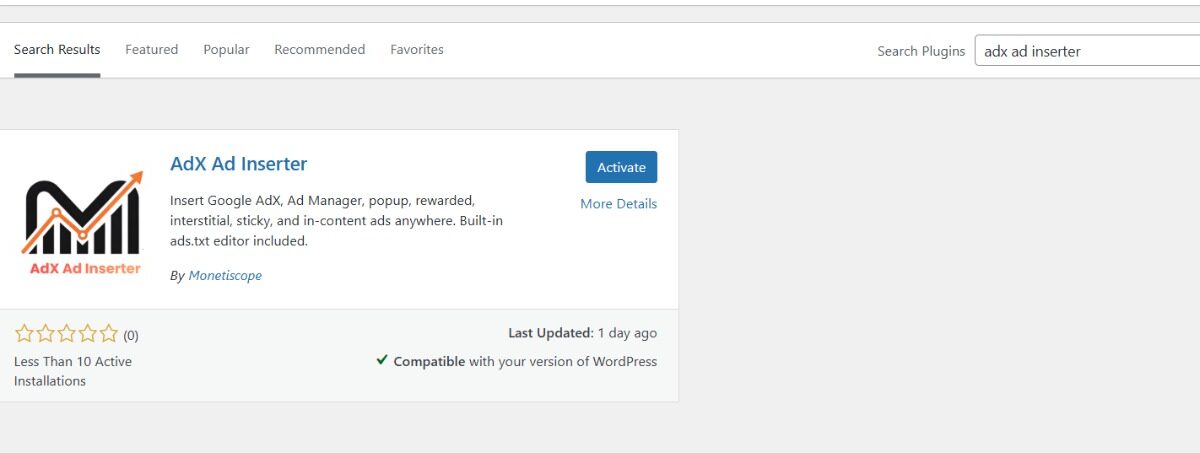
Search “AdX Ad Inserter“
Step 4
Install and activate
Step 5
Enable plugin from settings
Step 6
Paste your ad slot line
Example:
123456/site_300x250
Step 7
Click Save
Your ads go live instantly.
Why Publishers Prefer AdX Ad Inserter
• No long scripts required
• Extremely easy setup
• Supports advanced ad formats
• Lightweight and fast
• Beginner friendly
• Professional grade features
• Fully free to use
Therefore, it becomes an excellent choice for AdX users.
Support Contact
Email: support@monetiscope.com
WhatsApp: +91 9354200141
3. Advanced Ads (Best for Professional Publishers)
Advanced Ads provides powerful ad management tools.
It suits websites with high traffic.
Key Features
1. Visual ad placement
You see exactly where ads appear.
This improves placement accuracy.
2. Ad rotation
You can rotate ads automatically.
This increases revenue optimization.
3. Schedule ads
You can show ads at specific times.
This helps with campaigns.
4. Performance tracking
You can track ad performance.
This improves decision making.
4. WP QUADS (Best AdSense Alternative)
WP QUADS provides fast and simple ad placement.
It works well with AdSense and AdX.
Key Features
1. Beginner friendly interface
Anyone can use it easily.
No coding required.
2. Multiple placement options
You can insert ads in:
• Content
• Sidebar
• Widgets
3. Supports AMP ads
This improves mobile monetization.
5. Insert Headers and Footers (Best for Script Placement)
This plug-in focuses on header and footer scripts.
It does not provide advanced placement.
However, it helps with basic ad setup.
Key Features
1. Easy script insertion
You can add scripts safely.
No theme editing required.
2. Lightweight design
It does not slow your site.
3. Safe and secure
You avoid coding errors.
Comparison Table
| Plugin | Best For | Ease of Use | Advanced Features |
| AdX Ad Inserter | AdX and GAM users | Very Easy | Excellent |
| Ad Inserter | All ad networks | Medium | Excellent |
| Advanced Ads | Professional sites | Medium | Excellent |
| WP QUADS | AdSense users | Easy | Good |
| Insert Headers and Footers | Script placement | Very Easy | Basic |
Which Plug-in Should You Choose?
Your choice depends on your needs.
Choose AdX Ad Inserter if:
• You use Google AdX
• You use Google Ad Manager
• You want easiest setup
• You want slot-based placement
Choose Advanced Ads if:
• You need advanced targeting
Choose WP QUADS if:
• You use AdSense mainly
Choose Insert Headers and Footers if:
• You only need basic scripts
Best Ad Placement Strategy
Follow these best practices.
Place ads above the fold
This increases visibility.
Place ads inside content
This improves engagement.
Avoid too many ads
Too many ads reduce user experience.
Use anchor ads
Anchor ads perform very well.
Use interstitial ads carefully
They increase revenue but affect UX.
Final Thoughts
Ad placement determines your revenue success.
Without proper placement, you lose money.
Ad plug-ins simplify this process.
They improve efficiency.
They increase earnings.
Among all options, AdX Ad Inserter provides the easiest setup. It removes complexity. It improves efficiency. It supports advanced ad formats.
Therefore, it becomes an excellent choice for WordPress publishers using AdX and GAM.
Frequently Asked Questions (FAQ)
Which is the best ad placement plug-in for AdX?
AdX Ad Inserter is the best option. It supports direct ad slot placement. It simplifies setup significantly.
Do I need coding knowledge to use these plug-ins?
No. Most plug-ins require no coding knowledge. You only paste your ad code.
Does ad placement plug-in slow website speed?
No. Lightweight plug-ins do not slow your website. Choose optimized plug-ins like AdX Ad Inserter.
Can I use multiple ad networks together?
Yes. Most plug-ins support multiple ad networks. You can combine AdSense, AdX, and others.
Is AdX Ad Inserter free?
Yes. The plug-in is completely free to use.
What is the safest way to place ads?
Use plug-ins instead of editing theme files. This reduces errors and protects your website.
Which ad placement gives highest revenue?
In-article ads and anchor ads perform best. They provide higher engagement and impressions.
Can beginners use ad placement plug-ins?
Yes. Most plug-ins provide simple interfaces. Beginners can use them easily.