
Find Revenue Leaks Before They Cost You Money
Monetiscope Ad Inspector helps publishers instantly inspect ad placements, identify monetization issues, analyze ad setup, and uncover revenue optimization opportunities.
The Ultimate Ad Debugging & Yield Companion
Monetiscope Ad Inspector is a powerful, lightweight browser extension designed specifically for publishers, yield managers, and AdOps teams. It analyzes Google Publisher Tag (GPT) configurations, header bidding setups, and page layout signals directly within your browser tab.
No more digging through browser console logs or decoding complex network requests. Get a clear visual layout of ad health and yield opportunities in one click.
Stop Leaving Ad Revenue On The Table
Publishers lose up to 25% of their ad yield due to misconfigured ad units, slow scripts, or collapsed inventory slots that never load correctly.
Identify Revenue Leaks
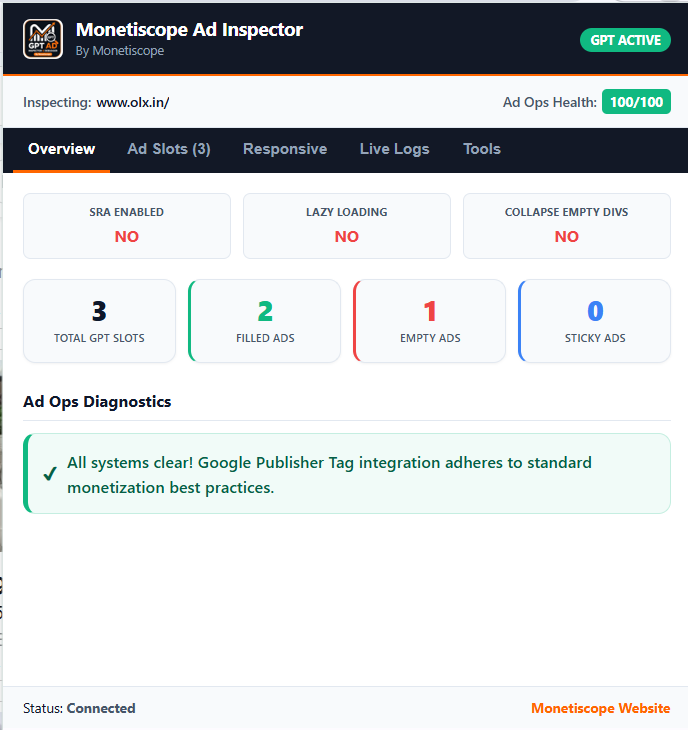
Unfilled ad slots that don't collapse create poor user experiences and represent direct revenue leaks. Find them and fix them instantly.
Verify Lazy Loading
Ensure your ads only request bids as they approach the user's viewport to drastically improve viewability rates and yield per impression.
Streamline Troubleshooting
AdOps teams spend hours digging through console output to verify tags. View exact GPT api states and live auction logs visually in real-time.
Built For Modern Ad Operations
Everything yield teams, ad managers, and developers need to analyze and optimize webpage ad setups.
SRA Setup Analyzer
Checks if Single Request Architecture is enabled to cluster ad calls, minimizing network roundtrips and optimizing delivery speed.
Lazy Loading Audit
Identifies if GPT lazy loading parameters are correctly initialized and tracks triggers as the user scrolls.
Empty Divs Checking
Checks if empty ad containers collapse correctly when no fill is received, preserving CLS and site visual balance.
Interactive Ad Slot Map
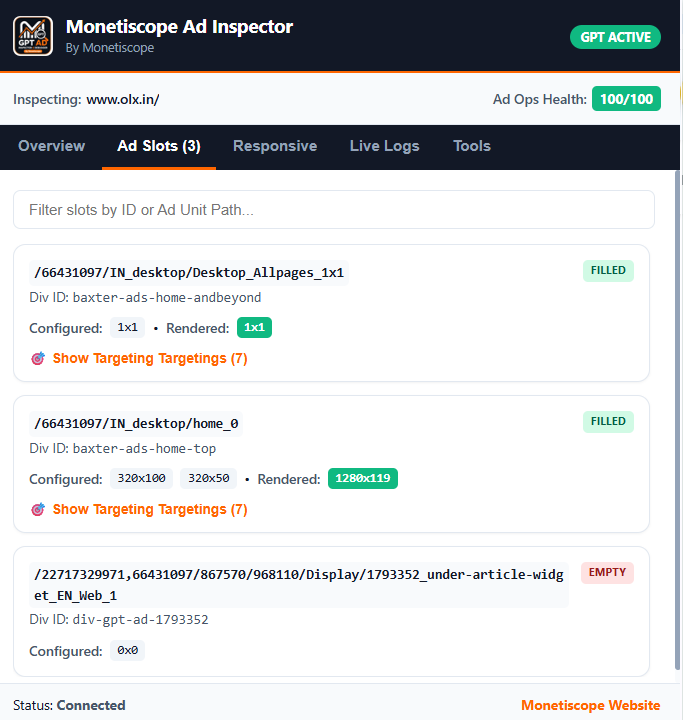
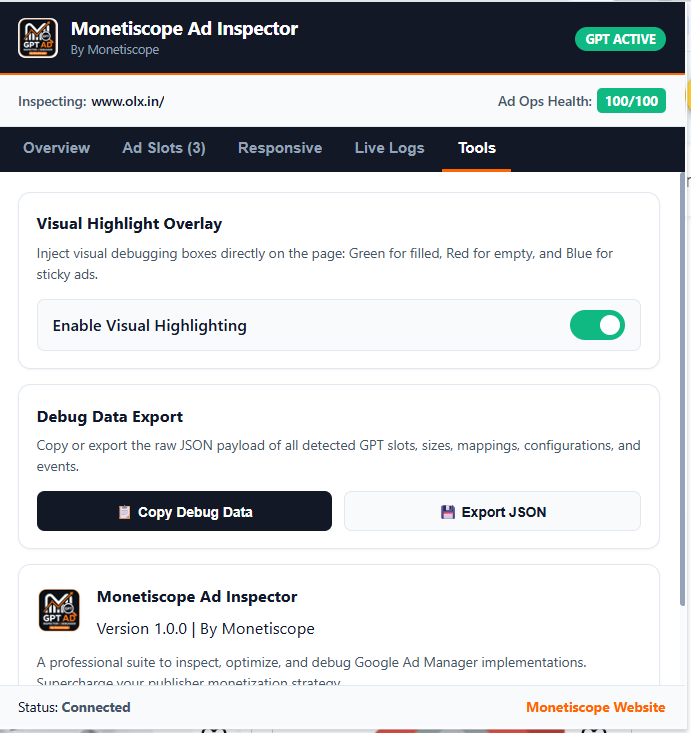
Renders a virtual layer over the page showing slot names, targeting parameters, size mapping arrays, and active sizes.
Live Auctions Log
Monitor Prebid and GPT log calls in real-time, highlighting auction timeouts, bidder latencies, and winning bids.
Privacy Compliance Check
Validates TCF strings, consent signals, and CCPA settings to verify privacy compliance before serving ads.
Audit Ad Yield in Four Simple Steps
Follow this basic pipeline to configure and start running ad quality audits directly inside your browser.
Install Monetiscope Ad Inspector
Get the official extension from the Chrome Web Store and pin it to your browser header bar for immediate access.
Load Your Page
Navigate to the webpage or article where you want to inspect ad slots, placements, or bidder setups.
Open DevTools or Extension Overlay
Right-click the page, open DevTools, select the "Monetiscope Ad Inspector" tab, or click the extension icon to view current metrics.
Analyze Results
Inspect setup warnings, trace bidding latency logs, review targeting configurations, and discover revenue optimization opportunities.
Granular Visibility Into Every Impression
Dig deep into the ad delivery stack to analyze exactly how ads are requested, bid on, and rendered.
Bidder CPM & Latency
Identify which prebid SSPs are slow, which bid responses time out, and view real-time CPM estimates per slot.
GPT Key-Value Targeting
Audit custom targeting keys, page-level key-values, and slot-level targeting variables to ensure campaign delivery rules match.
Creative Source Codes
Trace the direct line of rendering script code for any slot, making it simple to track down malicious or bloated ad creatives.
Designed For Publisher Success
A versatile diagnostic utility used across yield, product, and developer operations.
Yield Managers
Analyze how bidder setups and configuration adjustments affect CPM and overall yield, allowing data-driven monetization setups.
AdOps Engineers
Instantly audit live ad calls, targeting rules, consent signals, and setup errors without manual code inspection.
Front-End Devs
Optimize lazy loading thresholds, prevent visual layout shifts (CLS), and trace third-party script loading latencies.
Unlock Hidden Revenue Streams
Maximize yield and improve site loading profiles using automated visual troubleshooting diagnostics.
Optimize Viewability
Verify that your lazy loading parameters align with viewability triggers to raise the average value of your ad inventory.
Protect UX Quality
Ensure empty ad containers collapse cleanly and bidding integrations do not block the page content render path.
Eliminate Debug Bloat
Replace generic console logs and custom debug scripts with a structured visual inspector UI in your Chrome tab.
See Ad Inspector In Action
Take a tour through the user interface of our diagnostic extension showing live yield and placement audits.
Audit Ad Quality Across Every Context
Real-world examples of how publisher revenue teams solve complex configuration challenges using Ad Inspector.
Diagnosing Empty Slots
When an ad slot fails to render, Ad Inspector tells you if a bidder failed to fill or if the layout script blocked loading.
Validating CMP Strings
Ensure that TCF compliance signals match local publisher rules so compliance penalties are completely avoided.
Optimizing Header Bidding
Check timeout limits and response curves to identify slow header bidding adapters that are costing you bids.
Trusted By Publishers Worldwide
Yield managers, AdOps engineers, and media companies globally rely on Monetiscope Ad Inspector for precision ad diagnostics.
"Ad Inspector completely changed how our AdOps team debugs placements. We fixed a lazy loading misconfiguration that was costing us nearly 18% of our daily yield."
"Finally a tool that gives me instant visibility into GPT configurations without writing a single console script. This should be in every publisher's toolkit."
"We used Ad Inspector to identify bidder timeout issues across our header bidding stack. Within a week we saw a 12% CPM improvement on our top inventory."
"The GPT key-value targeting audit is incredibly detailed. We pinpointed a campaign delivery issue in minutes that our team had been chasing for days."
"The slot viewport mapping overlay feature saved us hours of work. I can now see exactly which ad slots are below the fold and not triggering bids at all."
"We integrated Ad Inspector into our QA process before every ad product launch. It catches configuration errors that would have cost us thousands in unmonetized impressions."
"Excellent tool for validating consent signals before ad delivery. We use it to verify TCF compliance across our publisher network before enabling header bidding."
"The live auction log feature is a game changer. We identified that two of our SSP bidders were consistently timing out and replaced them with better performing partners."
"Before Ad Inspector, our team spent 3-4 hours per week manually debugging ad tags. Now we can audit any page in under 5 minutes. Absolutely indispensable."
"Ad Inspector completely changed how our AdOps team debugs placements. We fixed a lazy loading misconfiguration that was costing us nearly 18% of our daily yield."
"Finally a tool that gives me instant visibility into GPT configurations without writing a single console script. This should be in every publisher's toolkit."
"We used Ad Inspector to identify bidder timeout issues across our header bidding stack. Within a week we saw a 12% CPM improvement on our top inventory."
"The GPT key-value targeting audit is incredibly detailed. We pinpointed a campaign delivery issue in minutes that our team had been chasing for days."
"The slot viewport mapping overlay feature saved us hours of work. I can now see exactly which ad slots are below the fold and not triggering bids at all."
"We integrated Ad Inspector into our QA process before every ad product launch. It catches configuration errors that would have cost us thousands in unmonetized impressions."
"Excellent tool for validating consent signals before ad delivery. We use it to verify TCF compliance across our publisher network before enabling header bidding."
"The live auction log feature is a game changer. We identified that two of our SSP bidders were consistently timing out and replaced them with better performing partners."
"Before Ad Inspector, our team spent 3-4 hours per week manually debugging ad tags. Now we can audit any page in under 5 minutes. Absolutely indispensable."
Manual Console Checks vs Ad Inspector
Compare the manual workflow of querying browser console API parameters against our automated extension interface.
| Analysis Metric | Manual Console Checks | Monetiscope Ad Inspector |
|---|---|---|
| GPT Library Verification | Requires writing console scripts | Automatic real-time mapping |
| SRA & Lazy Loading | Read raw object JSON arrays | Visual flag indicators |
| Bidding CPM Diagnostics | Scan networking responses | Interactive bidding logs chart |
| Consent Signal Status | Write custom API query scripts | Visual banner status display |
| Slot Viewport Mappings | Calculate slot offset positions | Overlay map highlights borders |
Frequently Asked Questions
Common technical and security questions regarding the operation and setup of Monetiscope Ad Inspector.
Start Inspecting Ads Smarter
Install Monetiscope Ad Inspector today and gain deep visibility into webpage ad slots and header bidding setups.