
WordPress 7.0 is finally here, and honestly, this update feels way bigger than a normal version release.
At first glance, many website owners may think:
“Okay, probably another editor update.”
But nope. This one is different.
WordPress 7.0 introduces major backend changes, AI infrastructure updates, admin workflow improvements, and performance-focused upgrades that could seriously affect publishers, bloggers, media sites, and monetized websites.
Especially websites running:
- Google AdSense
- Google AdX
- Header bidding
- Sticky ads
- Popups
- Custom ad scripts
- Revenue Booster Plugin
And let’s be real…
Most publishers update WordPress without even testing plugin compatibility first.
That’s exactly where things can get messy.
Some websites may work perfectly after updating.
Others? Yikes.
Broken layouts, ad rendering issues, plugin conflicts, dashboard bugs, RPM drops, and even site crashes are possible if you’re not prepared properly.
So in this guide, let’s break down:
- What’s new in WordPress 7.0
- What changed for publishers
- What could break
- How AI is entering WordPress
- Why monetized websites should be extra careful
- And how Monetiscope can help publishers stay optimized
This article is written specially for website publishers who manage content through WordPress daily.
And honestly, this update deserves attention.
What Is WordPress 7.0?
WordPress 7.0 is the latest major version of WordPress CMS.
It focuses heavily on:
- AI infrastructure
- Admin UI improvements
- Performance optimization
- Modern development architecture
- Better editor workflows
- Backend scalability
Now here’s the interesting thing.
This isn’t just another “visual update.”
WordPress is slowly transforming from:
“Simple blogging platform”
Into:
“Website operating system”
And no doubt, AI plays a massive role in that transition.
Why Publishers Should Actually Care About This Update
Most publishers care about:
- Traffic
- RPM
- SEO
- Ad revenue
- User experience
Right?
Well… WordPress 7.0 directly impacts all of them indirectly.
Because your:
- plugins
- themes
- ad scripts
- monetization systems
…all depend on WordPress core behavior.
And when core changes heavily, monetized websites must adapt carefully.
Especially websites using:
- sticky ads
- floating units
- interstitials
- lazy loading
- custom scripts
- video players
Honestly, this update matters more for publishers than casual bloggers.
The Biggest WordPress 7.0 Changes Explained
Let’s simplify everything.
1. AI Infrastructure Is Coming to WordPress
This is probably the most important long-term update.
WordPress 7.0 introduces early infrastructure for AI integrations.
That includes:
- AI connectors
- provider frameworks
- abilities API
- external AI integrations
Now before you panic…
WordPress is NOT replacing writers with AI.
At least not yet.
Instead, WordPress is preparing the system so plugins and services can integrate AI more deeply.
This means future plugins may offer:
- AI assistants
- AI content helpers
- AI SEO tools
- AI support systems
- AI optimization suggestions
And honestly, this is huge for publishers.
Because website management is becoming more automated.
What This Means for Publishers
In coming years, WordPress dashboards may include:
- AI content suggestions
- AI publishing workflows
- AI moderation systems
- AI monetization optimization
- AI support tools
That sounds exciting.
But also slightly scary.
Because low-quality AI spam content may increase even more online.
Google is already fighting this aggressively.
So publishers should focus on:
Helpful human-first content
Not AI-generated junk.
2. New Admin Dashboard Experience
WordPress admin now feels cleaner and more modern.
Changes include:
- improved typography
- better spacing
- smoother layouts
- cleaner menus
- better workflow navigation
Small change?
Maybe visually.
But operationally, it feels much smoother.
Especially for publishers managing content daily.
The Ctrl + K Command Palette
This is honestly pretty cool.
WordPress now supports a command palette shortcut.
Press:
Ctrl + K
And you can:
- search settings
- open pages
- jump between tools
- access workflows faster
It feels similar to:
- Notion
- VS Code
- Slack
This may sound small, but power users will love it.
Especially agencies and publishers managing large sites.
3. Real-Time Collaboration Was Removed
Now this part created massive buzz.
Initially, WordPress planned to launch:
Google Docs-style collaboration
Meaning:
multiple writers editing together live.
But during Release Candidate testing, developers found serious issues.
Including:
- database conflicts
- cache problems
- performance instability
- synchronization bugs
So WordPress completely removed this feature before final release.
Honestly?
Probably the right decision.
Because a broken live collaboration system could destroy publishing workflows.
Especially on large websites.
Why This Matters for Media Publishers
Imagine this happening:
- Editor updates article
- Writer edits same article
- Cache sync fails
- Content overwrites happen
Yikes.
For news websites, that’s dangerous.
So WordPress delayed collaboration features until future updates like 7.1 or 7.2.
4. PHP Requirement Changes
This is VERY important.
WordPress 7.0 now requires:
Minimum PHP 7.4
And officially recommends:
PHP 8.3+
Now here’s the problem.
A lot of publishers still run outdated hosting environments.
And many old plugins are not fully compatible with newer PHP versions.
That means after updating:
- plugins may break
- scripts may fail
- dashboards may crash
- monetization tools may stop working properly
Honestly, this is where many publishers face problems.
Publishers Should Test These Things Immediately
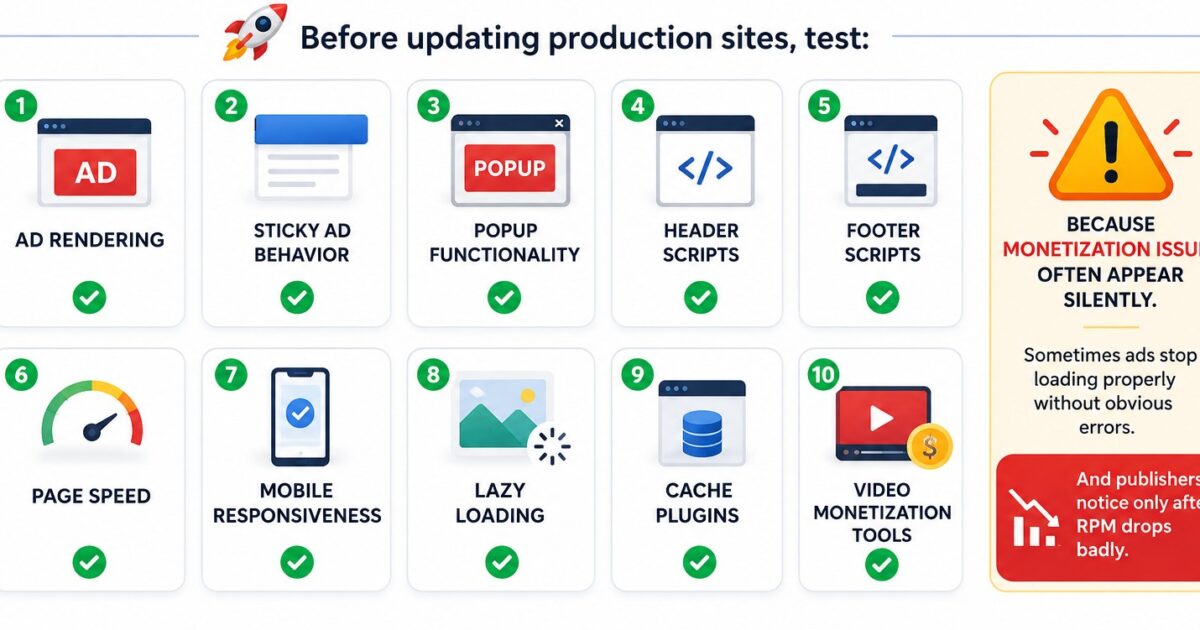
Before updating production sites, test:
- ad rendering
- sticky ad behavior
- popup functionality
- header scripts
- footer scripts
- page speed
- mobile responsiveness
- lazy loading
- cache plugins
- video monetization tools
Because monetization issues often appear silently.
Sometimes ads stop loading properly without obvious errors.
And publishers notice only after RPM drops badly.
5. Gutenberg Improvements
WordPress continues investing heavily in Gutenberg.
And yeah, Gutenberg is improving slowly.
WordPress 7.0 includes:
- better layouts
- improved block performance
- smoother editing experience
- cleaner design controls
Honestly, Gutenberg still divides people.
Some publishers love it.
Others still prefer classic workflows.
But one thing is clear:
WordPress is fully committed to block-based architecture now.
So publishers should adapt gradually.
What Could Break After Updating to WordPress 7.0?
This is probably the section publishers care about most.
Here are common risk areas.
| Area | Potential Problem |
|---|---|
| Ad plugins | Rendering conflicts |
| Sticky ads | CSS or JS issues |
| Popup systems | Trigger failures |
| Themes | Layout breaks |
| Cache plugins | Page delivery conflicts |
| Header bidding | Wrapper instability |
| Video ads | Script timing issues |
| Lazy loading | Ad refresh issues |
| Custom scripts | Deprecated functions |
Honestly, monetized websites are more sensitive than normal blogs.
Because ad systems depend heavily on:
- JavaScript timing
- DOM structure
- rendering behavior
- browser events
Even small WordPress changes can affect monetization badly.
Why AdTech Publishers Must Be Extra Careful
If your website earns through:
- AdSense
- AdX
- Programmatic ads
- Header bidding
- Video monetization
…then updates should NEVER happen blindly.
Because sometimes:
- viewability drops
- CLS increases
- ad loading delays happen
- sticky units malfunction
And boom…
Revenue drops.
Without obvious warning.
What Smart Publishers Should Do Before Updating
Honestly, this process matters a lot.
Step 1: Create a Staging Site
Never test directly on live website.
Use:
- staging environment
- local installation
- duplicate testing server
This protects your revenue.
Step 2: Test Monetization Properly
Don’t just check:
“Website opened successfully.”
Actually test:
- ads
- viewability
- mobile layouts
- page speed
- CLS
- RPM stability
This is where many publishers fail.
Step 3: Check Plugin Compatibility
Especially:
- ad plugins
- SEO plugins
- cache plugins
- security plugins
- AI plugins
Outdated plugins create biggest risks.
Step 4: Monitor RPM After Update
Even if website works fine visually…
Watch:
- CTR
- viewability
- RPM
- impressions
- ad request stability
Because monetization issues can hide silently.
WordPress 7.0 and AI SEO
This topic is getting massive attention right now.
Since AI systems are entering WordPress, many people think:
“AI will replace SEO.”
Not really.
Google already confirmed:
Helpful human content still matters most.
So publishers should avoid:
- AI spam
- mass-generated articles
- repetitive low-value content
Instead focus on:
- experience
- expertise
- helpful tutorials
- practical guides
- real case studies
That’s what ranks better now.
Myth vs Truth About WordPress 7.0
| Myth | Truth |
|---|---|
| WordPress 7.0 is only visual update | It changes backend architecture heavily |
| AI will replace bloggers | Human-first content still matters |
| All plugins will work automatically | Compatibility issues are possible |
| Updating immediately is always safe | Testing first is smarter |
| Gutenberg is optional long-term | WordPress is moving fully block-first |
How Monetiscope Helps Publishers During Updates
At Monetiscope, we work closely with publishers and monetized websites daily.
And honestly, platform updates often affect revenue more than publishers realize.
Our team helps publishers with:
- ad optimization
- viewability improvement
- implementation quality
- monetization workflows
- ad compliance
- RPM optimization
- plugin compatibility guidance
We also built:
AdX Ad Inserter
A monetization-focused WordPress plugin specially designed for Ad Exchange publishers.
It helps simplify:
- ad placements
- sticky ads
- header/footer ads
- rewarded ads
- interstitials
- ads.txt management
While maintaining better implementation consistency.
Because honestly, many revenue losses happen due to poor ad setup.
Not just low traffic.
Why WordPress 7.0 Matters for AdX Publishers
AdX publishers rely heavily on:
- viewability
- UX
- rendering speed
- layout stability
And WordPress core changes can affect all of these.
That’s why:
- testing
- optimization
- compatibility checks
…become extremely important after major updates.
Especially if your revenue depends on ads daily.
Should Publishers Update Immediately?
Honestly?
Probably not.
Safer approach:
Wait for WordPress 7.0.1 or 7.0.2
Unless:
- you tested everything properly
- plugins are compatible
- monetization remains stable
Large publishers usually wait before production rollout.
And that’s smart.
The Future of WordPress Looks Very Different
WordPress is slowly evolving into:
- AI-integrated ecosystem
- automation platform
- workflow engine
- application framework
This means future publishing may include:
- AI workflows
- smart monetization
- automated optimization
- intelligent publishing systems
And honestly, publishers who adapt early may gain huge advantages.
Final Thoughts
WordPress 7.0 is not a small update.
It’s a major infrastructure shift.
Especially for publishers running monetized websites.
The future of publishing is becoming:
- smarter
- AI-assisted
- performance-focused
- workflow-driven
But one thing still matters most:
Quality user experience.
Because no matter how advanced WordPress becomes…
Bad content and poor monetization experience still won’t survive long-term.
So before updating:
- test carefully
- monitor revenue
- optimize properly
- prepare for compatibility changes
And if you run monetized websites seriously, don’t ignore this update.
It may affect your revenue more than you expect.
FAQs
What is WordPress 7.0 mainly focused on?
WordPress 7.0 focuses on AI infrastructure, backend modernization, admin UI improvements, and performance optimization.
Is WordPress 7.0 safe for monetized websites?
It can be safe, but publishers should test plugins, ad rendering, and monetization systems carefully before updating.
Will WordPress 7.0 affect ad revenue?
Potentially yes. Poor compatibility or broken ad behavior can impact RPM, viewability, and impressions.
Why was real-time collaboration removed?
Developers discovered performance and synchronization issues during testing, so WordPress delayed the feature for future releases.
Should publishers update immediately after release?
Honestly, waiting for 7.0.1 or 7.0.2 is usually safer for production websites.
What plugins should publishers test first?
Ad plugins, cache plugins, SEO plugins, security tools, and custom scripts should be tested carefully.
Does WordPress 7.0 include AI writing tools?
Not directly. It mainly introduces infrastructure for future AI integrations and plugin compatibility.
Can old themes break after updating?
Yes, especially outdated themes or themes using deprecated functions.
How does Monetiscope help publishers?
Monetiscope helps publishers improve monetization performance, ad implementation quality, viewability, and monetization workflows.
What is AdX Ad Inserter?
AdX Ad Inserter is a WordPress plugin by Monetiscope designed specially for Ad Exchange publishers to simplify ad placements and monetization management.